
Creating Notes
Apollo can create several types of clinical documents from the information you provide. Each document type has its own structure, but the basic workflow is the same: choose the document, provide clear source material, create the draft, then review and edit it before saving or exporting.
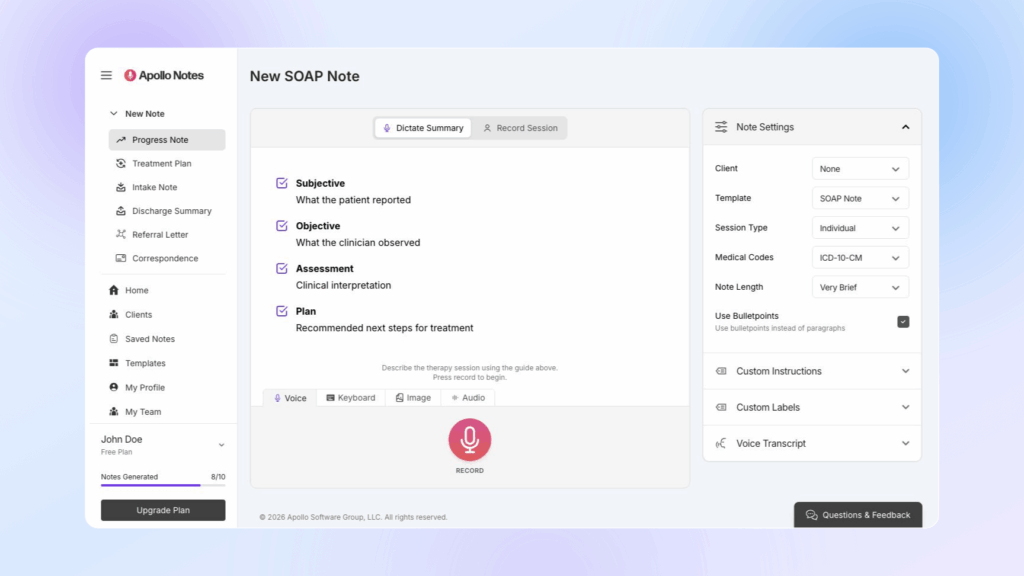
Use the guide shown on the note creation screen as a checklist for the selected template. It shows the sections Apollo expects to create, such as Subjective, Objective, Assessment, and Plan for a SOAP note.
AI-generated documentation should always be reviewed before it becomes part of the clinical record. Check clinical facts, diagnosis language, risk content, medical code suggestions, insurance-related language, and the plan for accuracy and fit.
Progress Notes
Progress notes summarize a therapy session, the interventions used, the client response, clinical assessment, and the plan for next steps.
To create a progress note:
- Choose Progress Note from the dashboard or sidebar.
- Select a client if you want Apollo to use saved client context.
- Choose a template in Note Settings.
- Choose the session type: Individual, Couple, or Group.
- Set any note options you need.
- Provide the session information with Dictate Summary or Record Session.
- Create, review, edit, and save the note.
Progress Note Templates
Apollo includes common progress note formats:
- SOAP Note: Subjective, Objective, Assessment, and Plan.
- Extended SOAP Note: A more detailed SOAP format with additional prompts for chief complaint, recent changes, clinical observations, interventions, client response, mental status, diagnosis, goals, homework, and next appointment.
- DAP Note: Data, Assessment, and Plan.
- BIRP Note: Behavior, Intervention, Response, and Plan.
- GIRP Note: Goal, Intervention, Response, and Plan.
Choose the format that matches your documentation standard, payer requirements, or agency preference. If your account has custom templates, they may also appear in the template menu.
Session Type
For progress notes, choose the session type before generating:
- Individual for one client.
- Couple for two client participants.
- Group for group sessions.
When using Record Session with a Group session, Apollo also asks for the No. of Participants. This helps the transcription workflow accurately identify the expected number of speakers.
Before starting a Record Session recording, choose the Audio input in the recording panel. Use Microphone for room audio, Browser tab or window for supported telehealth workflows where Apollo should capture shared browser audio with your microphone, or Select Audio File for an existing full-session recording.
What To Include
Apollo works best when your source material includes the clinically relevant parts of the session. For a progress note, include:
- Presenting concern or session focus.
- Important client statements or themes.
- Interventions, modalities, or techniques used.
- Client response to interventions.
- Risk or safety content, including relevant denials.
- Diagnosis-relevant symptoms or functional changes.
- Progress toward goals.
- Homework, referrals, follow-up, and next session plan.
A concise summary can be enough. For example:
Client attended individual telehealth session focused on panic symptoms at work. Therapist used CBT psychoeducation, breathing practice, and cognitive restructuring. Client reported two panic episodes this week, denied suicidal or homicidal ideation, and practiced identifying catastrophic thoughts. Plan is to continue weekly CBT, complete thought record homework, and review exposure hierarchy next session.
Before saving, verify that the draft accurately reflects what occurred, uses appropriate risk language, and supports any diagnosis, plan, or code suggestions.
Treatment Plans
Treatment plans organize the clinical problem, goals, interventions, and expected course of care. Use this document type when you need a structured plan rather than a session summary.
Provide details such as:
- Presenting problems.
- Mental health history.
- Diagnosis or diagnostic impressions.
- Treatment goals.
- Measurable objectives.
- Planned interventions.
- Treatment modalities.
- Session frequency.
- Expected duration of treatment.
- Current progress, if treatment has already started.
- Discharge criteria.
A treatment plan draft should be reviewed for clinical fit. Make sure the goals are measurable, the interventions match the diagnosis and presenting concerns, and the frequency and duration are appropriate for the client.
If you save treatment plan information to a client profile, Apollo can use that context later when creating future notes for that client.
Intake Notes
Intake notes document the beginning of care. Use an intake note when you are summarizing an assessment, first appointment, or intake interview.
Include the information you want Apollo to consider, such as:
- Referral source.
- Presenting issues.
- History of present illness.
- Psychiatric history.
- Medical history, medications, and allergies.
- Substance use history.
- Family history.
- Social and developmental history.
- Mental status examination.
- Risk assessment.
- Diagnostic impressions.
- Initial treatment plan.
You can create intake notes from typed summaries, dictated summaries, uploaded images of written notes, uploaded audio, or supported recording workflows. If you use image or audio input, review the extracted text or transcript before relying on the generated note.
Review sensitive history, diagnosis, and risk sections closely. Intake notes often contain broad background information, so remove anything that is inaccurate, unnecessary, or outside the intended record.
If you want future notes to reference intake information, copy the final intake summary into the client’s profile under Intake Assessment.
Discharge Summaries
A discharge summary closes or summarizes a course of treatment. Use it when treatment is ending, care is being transferred, or a final summary is needed beyond a regular progress note.
Provide details such as:
- Date of discharge.
- Final diagnosis.
- Treatment course or treatment summary.
- Progress toward treatment goals.
- Outcomes and remaining needs.
- Reason for discharge.
- Referrals, aftercare, or follow-up recommendations.
Use a discharge summary instead of a final progress note when the document needs to describe the overall treatment episode, not just the last session.
Before saving or exporting, confirm that the discharge reason, diagnosis, outcomes, and recommendations are accurate and stated in a clinically appropriate way.
Referral Letters
Referral letters help draft professional correspondence to another clinician, provider, program, or service. They are different from clinical notes because they are written for an outside recipient and should include only the information needed for the referral.
Useful source details include:
- Information about you as the referring clinician.
- Client identifying information appropriate for the letter.
- Recipient or referral destination.
- Reason for referral.
- Current diagnosis, if relevant.
- Clinical concern or treatment need.
- Brief mental health history.
- Current treatment plan and progress.
- Requested follow-up or recommendations.
Review referral letters for privacy and minimum-necessary disclosure before sending. Remove details the recipient does not need, and confirm that the tone, recipient, and requested action are correct.
General Correspondence
General Correspondence creates a professional letter or message from the contents you provide. Use it for communication with clients, clinicians, schools, attorneys, agencies, or other parties when a clinical note format is not appropriate.
For best results, provide:
- Who the message is for.
- The purpose of the message.
- The key facts to include.
- The tone you want, such as brief, formal, warm, or direct.
- Any deadline, requested action, or next step.
- Any details that should not be included.
General correspondence may include privacy-sensitive information. Review the final text carefully before sending, copying, or exporting it.
Note Settings
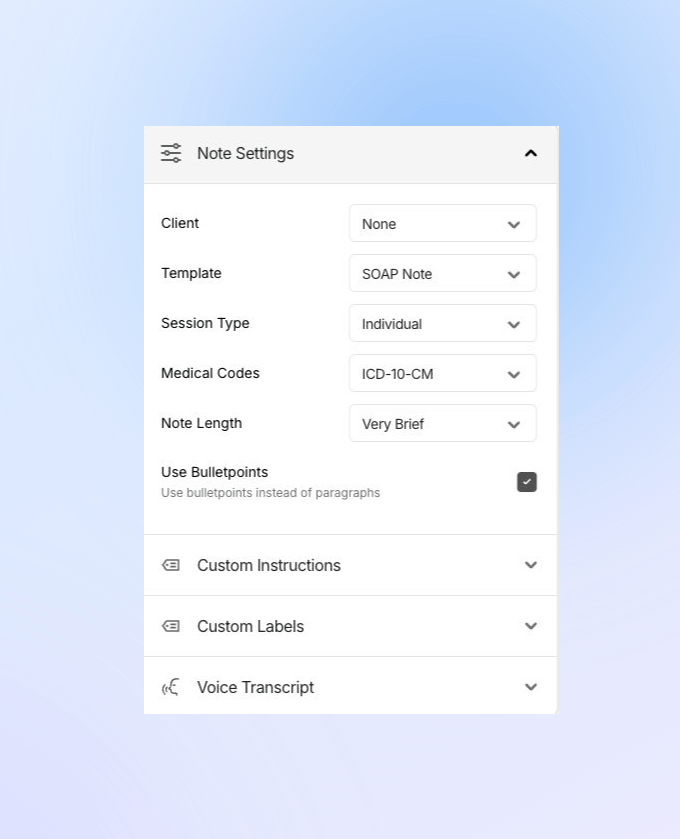
The Note Settings panel controls how Apollo creates the draft. Some settings only appear for certain document types, templates, or input workflows.
Client
Select a client when you want Apollo to use saved client context, such as intake assessment, treatment plan and goals, or custom client instructions. The current summary, transcript, or uploaded source material still matters most, so include the details that are specific to this document.
Template
The template controls the structure of the note. Built-in templates appear for standard document types, and custom templates may appear when available on your account.
For progress notes, the template menu includes built-in progress note formats such as SOAP, Extended SOAP, DAP, BIRP, and GIRP.
Session Type
Session Type appears for progress notes and custom templates. Choose Individual, Couple, or Group to help Apollo understand the clinical context and, in Record Session workflows, the speaker structure.
For Group sessions in Record Session mode, enter the No. of Participants before recording or uploading session audio.
Medical Codes
When available for the selected note type or template, Medical Codes lets you choose:
- None
- ICD-10-CM
- ICD-11
- DSM-5-TR
Treat generated codes or code-related panels as suggestions. Confirm diagnosis, medical necessity, payer rules, and documentation standards before using them.
Note Length
When available, Note Length controls how much detail Apollo includes:
- Very Brief for the shortest clinically acceptable draft.
- Brief for a concise draft.
- Auto to let Apollo choose an appropriate length.
- Extended for more detail.
Choose the shortest length that still supports the document’s clinical and administrative purpose.
Use Bulletpoints
Use Use Bulletpoints when you prefer bullet-style sections instead of paragraphs. This option does not appear for Referral Letter, General Correspondence, or imported Word document templates.
Custom Instructions
Use Custom Instructions for short, specific guidance about how Apollo should draft this note. For example, you might ask Apollo to emphasize measurable objectives, use a specific documentation style, or avoid unnecessary detail.
For complex document structures, use a custom template instead of long instructions.
Custom Labels
Custom Labels let you control how Apollo refers to participants, such as the therapist and patient. These labels can help match your agency’s preferred wording.
For clinical note types, Use Common Abbreviations can shorten common terms, such as using Dx for diagnosis or Tx for treatment. This option is not shown for Referral Letter or General Correspondence.